Angely Font for Modern Vintage Web Design
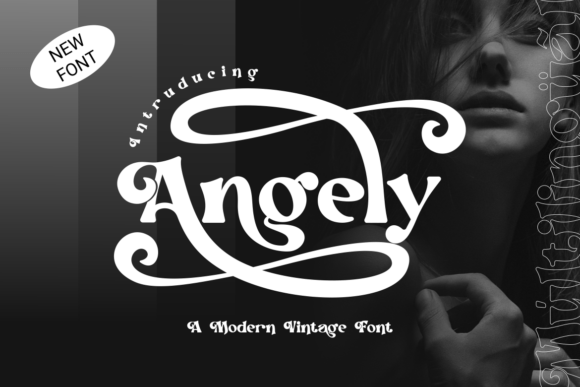
When curating a library of premium Display Fonts for high-impact digital projects, Angely stands out as a transformative tool for web designers and UI creators. This typeface is not merely a collection of glyphs; it is a strategic asset for building brand identity in crowded online spaces. By leveraging the thick, luscious weight and dramatic swashes inherent to Angely, designers can create immediate visual hierarchy and emotional resonance on landing pages, hero sections, and product banners.
Creating Visual Hierarchy with Angely Display Typography
In the context of web design, readability and attention management are paramount. Angely functions exceptionally well as a primary Display element because its oversized swashes and heavy stroke contrast naturally draw the eye. When used in hero headers or above-the-fold content, this font commands attention without requiring excessive screen real estate. The nostalgic yet fresh aesthetic allows it to bridge the gap between classic elegance and modern minimalism, making it ideal for brands that want to convey trustworthiness alongside creativity.
For UI designers, the challenge is often balancing decorative elements with functional clarity. Angely’s thick weight ensures that headlines remain legible even against complex background images or video overlays, provided there is sufficient contrast. However, due to its decorative nature, it is best reserved for short phrases, titles, and call-to-action buttons rather than long-form body copy. Using Angely for section headings creates a rhythmic scanning experience, guiding users through the narrative of a landing page or sales funnel with distinct typographic breakpoints.
Enhancing Brand Identity on Landing Pages and Hero Sections
A landing page has seconds to communicate a brand’s value proposition, and typography plays a critical role in this initial impression. Angely offers a unique "modern-vintage" personality that can define the tone of a digital product before a single image is processed by the user. For creative entrepreneurs, boutique online stores, and coaching websites, this font adds a layer of sophistication that standard sans-serif headers often lack. The dramatic swashes act as subtle graphic elements, reducing the need for additional decorative icons or dividers in the layout.
Consider a scenario where you are designing a sales page for a high-end course or a luxury e-commerce store. Integrating Angely into the main headline creates an immediate perception of value and exclusivity. The luscious weight of the font suggests substance and quality, while the fresh details keep the design from feeling dated. This balance is crucial for conversion-focused layouts, where the goal is to evoke an emotional response that leads to a click. By anchoring the visual identity with such a distinctive typeface, you ensure that the brand remains memorable long after the user has left the site.
Optimizing Angely for Mobile Responsiveness and Readability
While Angely shines on desktop screens, mobile responsiveness requires careful implementation. The intricate details and oversized swashes that make this font beautiful on large monitors can become cluttered on smaller devices if not managed correctly. As a web designer, you must adjust line heights and letter spacing to prevent the swashes from colliding with adjacent letters or interface elements. On mobile, it is advisable to use Angely strictly for primary headlines and avoid using it for secondary subheads where space is limited.
To maintain readability across devices, pair Angely with a clean, highly legible sans-serif font for body text. This contrast ensures that while the header captures attention, the supporting information remains easy to scan. When using Angely on dark backgrounds, ensure the font weight is bold enough to prevent the thin parts of the swashes from disappearing due to screen pixelation. Conversely, on light backgrounds, the thick strokes provide excellent contrast, making it a versatile choice for various color schemes in digital ads and social media graphics.
Strategic Font Pairing for Digital Product Creators
Selecting the right companion typeface is essential when working with a strong display font like Angely. Because Angely carries significant visual weight and personality, it pairs best with neutral, geometric sans-serif fonts that do not compete for attention. This combination creates a balanced editorial look that is popular in modern web design. For a more traditional or literary feel, pairing Angely with a classic serif font can enhance the vintage aspect of its design, suitable for blogs, magazines, or storytelling-focused websites.
Digital product creators should consider the overall tone of their brand kit when choosing these pairings. If the goal is to appear approachable and modern, a humanist sans-serif works well. If the aim is luxury and authority, a sharp, high-contrast serif complements Angely’s dramatic flair. Testing these combinations in actual UI components—such as navigation bars, footers, and card layouts—helps determine the optimal balance. The key is to let Angely serve as the accent piece that elevates the design, while the secondary font handles the heavy lifting of information delivery.
Licensing and Technical Implementation for Web Projects
Before integrating Angely into client projects or commercial products, understanding licensing requirements is crucial. Most premium display fonts require specific webfont licenses for use on live websites, distinct from desktop licenses used for graphic design. Ensure that the file formats provided include WOFF and WOFF2 for optimal web performance and loading speeds. Slow-loading fonts can negatively impact user experience and SEO rankings, so optimizing font files is a necessary step in the development process.
Additionally, check for multilingual support if your target audience is global. While Angely’s dramatic style may be primarily designed for Latin scripts, verifying character sets ensures consistency across different language versions of your site. For developers, implementing CSS font-display properties can help manage how the font loads, preventing layout shifts that disrupt the user experience. By treating Angely as a core component of your technical stack, you ensure that its visual impact is preserved without compromising site performance.
Ultimately, Angely is more than just a font; it is a design decision that influences how users perceive and interact with digital content. Whether used for a portfolio site, an online store banner, or a branded app interface, its ability to convey nostalgia and freshness simultaneously makes it a powerful tool in the modern designer’s arsenal. By applying it strategically within visual hierarchies and pairing it thoughtfully, you can create digital experiences that are not only visually stunning but also effective in achieving business goals.